¶ Design: Remote Controller
There are a variety of wireless remote controllers that are available on the market today. Consider the infrared remote control used to control the TV, the remote keyless entry used to unlock a car, the Bluetooth mouse to control a PC, or the WiFi connection to control a home automation system. Each has various strengths and weaknesses that make it suitable for its application. Some of these performance characteristics include: power consumption, range, ability to avoid interference, data throughput, and latency. Depending on the data that is being transmitted a different type of wireless communication may be appropriate.
Bluetooth is a ubiquitous wireless technology that is used in a variety of products today. There is a whole category of Bluetooth devices that follow the Human Interface Device (HID) specification. These devices are common input devices used with computers such as keyboards, mice, joysticks, microphones, and more. Since this remote controller will be the interface between the robots and the humans this protocol makes sense. The microcontroller will need custom firmware to scan for available controllers and to attach to those controllers when found.
A common Bluetooth controller that has been available on the market for many years is the PlayStation DualShock 4 Controller. These are robust controllers that can handle the wear and tear of video games. They are low cost, easy to obtain, and most people have used them before. Picking up a controller and driving a robot will be second-nature with one of these controllers and intuitive drive mappings. Finally and most importantly, many details of the protocol that this controller uses are available online. This has made these controllers popular among the electronics community as an easy way to control a custom robot.
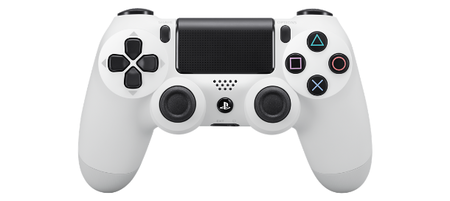
Dualshock 4 Controller[1]
*Note - this guide uses a PlayStation brand controller. Off-brand controllers may work differently, and we strongly suggest if you intend to use the provided code, you should use a PlayStation brand DualShock 4 controller.
¶ References
Image taken from https://www.psdevwiki.com/ps4/DS4-BT ↩︎